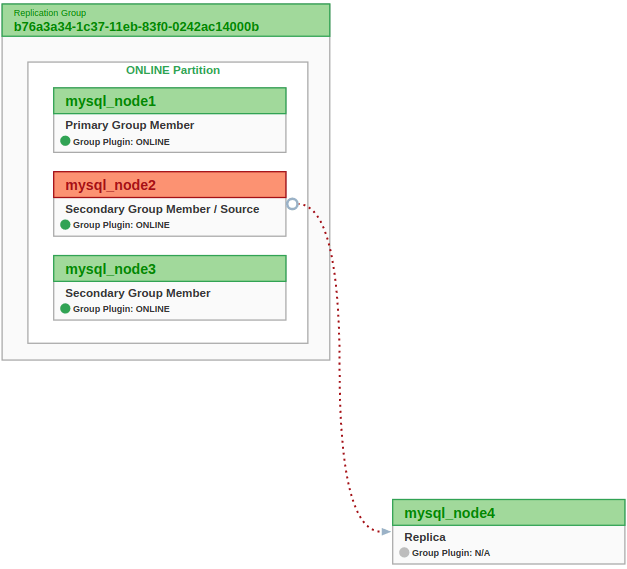
Since MySQL 8.0.22 there is a mechanism in asynchronous replication that makes the receiver automatically try to re-establish an asynchronous replication connection to another sender, in case the current connection gets interrupted due to the failure of the current sender.
Asynchronous automatic connection failover automates the process of re-establishment of an asynchronous replication connection to another sender of sender list. That means if a the source of a replica crashed, this replica will be able to automatically connect to another source. One of the biggest interest is to improve Disaster Recovery (DR) architecture.
With this feature, a typical architecture is to have a 3 nodes asynchronous replication cluster. 2 primary nodes in active/passive mode (if you need active/active architecture use MySQL InnoDB Cluster) and the third one is connected to one of the primary, either for DR or for some specialized task like analytics for example. So in case of unavailability of its primary – if the replication I/O thread stops due to the source stopping or due to a network failure – this replica will automatically connect to the other primary.
Like you know, there are some preparation steps to be able to use MySQL Asynchronous Replication. If you’re not familiar with replication using GTID, please read this.
On the Group Replication primary – currently mysql_node1 – I setting up the asynchronous replication user:
mysql_node1:3306 ssl SQL>
CREATE USER 'repl'@'172.20.0.%' IDENTIFIED BY 'S3cr€tRepl' REQUIRE SSL;
GRANT REPLICATION SLAVE ON *.* TO 'repl'@'172.20.0.%';
It permits cloning data locally or from a remote MySQL server instance. Cloned data is a physical snapshot of data stored in InnoDB that includes schemas, tables, tablespaces, and data dictionary metadata. The cloned data comprises a fully functional data directory, which permits using the clone plugin for MySQL server provisioning.
It’s a very convenient way to copy data from the source (the Group Replication) to the replica (mysql_node4).
Thanks to InnoDB Cluster the Clone plugin is already installed on the 3 members. So on the primary member – currently mysql_node1 – I’ll create a dedicated clone user with the donor privileges for using and monitoring the clone plugin:
mysql_node1:3306 ssl SQL>
CREATE USER clone_user IDENTIFIED BY "S3cr€tClone";
GRANT BACKUP_ADMIN, EXECUTE ON *.* TO clone_user;
GRANT SELECT ON performance_schema.* TO clone_user;
Note that I could have used the cluster administrator dedicated user instead of create a specialized clone user.
On mysql_node4, the future replica, I’ll create the same user but with the recipient privileges. But before I’ll install the clone plugin and set the clone donor list:
mysql_node4:3306 ssl SQL>
INSTALL PLUGIN clone SONAME 'mysql_clone.so';
SET PERSIST clone_valid_donor_list = 'mysql_node1:3306,mysql_node2:3306,mysql_node3:3306';
CREATE USER clone_user IDENTIFIED BY "S3cr€tClone";
GRANT CLONE_ADMIN, EXECUTE ON *.* to clone_user;
GRANT SELECT ON performance_schema.* TO clone_user;
Clone a MySQL instance
Now we have everything all set to create the replica from a member of the group.
On the future replica – mysql_node4 – we can now run the clone instance command:
mysql_node4:3306 ssl SQL>
CLONE INSTANCE FROM 'clone_user'@'mysql_node1':3306 IDENTIFIED BY 'S3cr€tClone';
If you want to monitor the cloning progress run the following query:
mysql_node4:3306 ssl SQL>
SELECT
STATE,
CAST(BEGIN_TIME AS DATETIME) AS "START TIME",
CASE WHEN END_TIME IS NULL THEN LPAD(sys.format_time(POWER(10,12) * (UNIX_TIMESTAMP(now()) - UNIX_TIMESTAMP(BEGIN_TIME))), 10, ' ')
ELSE
LPAD(sys.format_time(POWER(10,12) * (UNIX_TIMESTAMP(END_TIME) - UNIX_TIMESTAMP(BEGIN_TIME))), 10, ' ') END AS DURATION
FROM performance_schema.clone_status;
When the cloning is over, the MySQL instance must be restarted (that will normally happen automatically). After the restart, you can verify that the clone completed successfully with the queries below:
mysql_node4:3306 ssl SQL>
SELECT
STATE,
ERROR_NO,
BINLOG_FILE,
BINLOG_POSITION,
GTID_EXECUTED,
CAST(BEGIN_TIME AS DATETIME) as "START TIME",
CAST(END_TIME AS DATETIME) as "FINISH TIME",
sys.format_time(POWER(10,12) * (UNIX_TIMESTAMP(END_TIME) - UNIX_TIMESTAMP(BEGIN_TIME))) AS DURATION
FROM performance_schema.clone_status \G
and:
mysql_node4:3306 ssl SQL>
SELECT
STAGE,
STATE,
CAST(BEGIN_TIME AS DATETIME) as "START TIME",
CAST(END_TIME AS DATETIME) as "FINISH TIME",
LPAD(sys.format_time(POWER(10,12) * (UNIX_TIMESTAMP(END_TIME) - UNIX_TIMESTAMP(BEGIN_TIME))), 10, ' ') AS DURATION
FROM performance_schema.clone_progress;
Add the replica
First I will setup the configuration information for a replication source server to the source list for a replication channel. To do that we use the function: asynchronous_connection_failover_add_source Information needed are the replication channel name, the source server address, port and network namespace, and also the weight.
The replica’s source lists for each replication channel for the asynchronous connection failover mechanism can be viewed in the Performance Schema table replication_asynchronous_connection_failover.
To set the parameters that the replica server uses for connect to the source, we use the well known CHANGE MASTER TO statement. You already know most of its clauses, so let’s only focus on some of them:
SOURCE_CONNECTION_AUTO_FAILOVER : activates the asynchronous connection failover mechanism.
MASTER_RETRY_COUNT & MASTER_CONNECT_RETRY : define the failover time. The default setting is… 60 days, probably not what you want :). So, you (most likely) should reduced the settings. e.g. 1 minute is respectively 20 and 3. (20 x 3 = 60)
FORCHANNEL : enables you to name which replication channel the statement applies to. The CHANGE MASTER TO statement applies to this specific replication channel.
Now let’s configure the replication:
mysql_node4:3306 ssl SQL>
CHANGE MASTER TO MASTER_USER='repl', MASTER_PASSWORD='S3cr€tRepl', MASTER_HOST='mysql_node2', MASTER_PORT=3306, MASTER_AUTO_POSITION=1, MASTER_SSL=1, SOURCE_CONNECTION_AUTO_FAILOVER=1, MASTER_RETRY_COUNT=3, MASTER_CONNECT_RETRY=5 FOR CHANNEL 'autof';
Please note that my failover time in this tutorial is 15 seconds (3 x 5). Obviously the relevant setting depends on your needs. A longer duration will probably makes more sense in real life.
Then start the replication, on channel autof using START REPLICA:
mysql_node4:3306 ssl SQL>
START REPLICA FOR CHANNEL "autof";
Status information of the replication can be seen with SHOW REPLICA:
We have now configured our replication, with an InnoDB Cluster/Group Replication as a source and a standalone MySQL server as a replica. Let’s see how the automatic connection failover works.
Restart the replica
I want to see the behavior after a restart of the replication.
State before the stop:
mysql_node4:3306 ssl SQL>
SELECT
CHANNEL_NAME,
SERVICE_STATE,
HOST,
CONNECTION_RETRY_INTERVAL,
CONNECTION_RETRY_COUNT
FROM replication_connection_configuration
INNER JOIN replication_applier_status
USING (CHANNEL_NAME)
WHERE CHANNEL_NAME = 'autof'\G
*************************** 1. row ***************************
CHANNEL_NAME: autof
SERVICE_STATE: ON
HOST: mysql_node2
CONNECTION_RETRY_INTERVAL: 5
CONNECTION_RETRY_COUNT: 3
Stop the replication:
mysql_node4:3306 ssl SQL>
STOP REPLICA;
SELECT
CHANNEL_NAME,
SERVICE_STATE,
HOST,
CONNECTION_RETRY_INTERVAL,
CONNECTION_RETRY_COUNT
FROM replication_connection_configuration
INNER JOIN replication_applier_status
USING (CHANNEL_NAME)
WHERE CHANNEL_NAME = 'autof'\G
*************************** 1. row ***************************
CHANNEL_NAME: autof
SERVICE_STATE: OFF
HOST: mysql_node2
CONNECTION_RETRY_INTERVAL: 5
CONNECTION_RETRY_COUNT: 3
After a while, start the replication:
mysql_node4:3306 ssl SQL>
START REPLICA;
SELECT
CHANNEL_NAME,
SERVICE_STATE,
HOST,
CONNECTION_RETRY_INTERVAL,
CONNECTION_RETRY_COUNT
FROM replication_connection_configuration
INNER JOIN replication_applier_status
USING (CHANNEL_NAME)
WHERE CHANNEL_NAME = 'autof'\G
*************************** 1. row ***************************
CHANNEL_NAME: autof
SERVICE_STATE: ON
HOST: mysql_node2
CONNECTION_RETRY_INTERVAL: 5
CONNECTION_RETRY_COUNT: 3
Replica picks up where it left off… as you would have expected.
Short unavailability of the source
I want to see the behavior after a short unavailability of the source. I mean a duration lower than the failover threshold – connection_retry_interval x connection_retry_count – 15 seconds (5×3) in this example.
State before the stop of the source, mysql_node2:
mysql_node4:3306 ssl SQL>
SELECT
CHANNEL_NAME,
SERVICE_STATE,
HOST,
CONNECTION_RETRY_INTERVAL,
CONNECTION_RETRY_COUNT
FROM replication_connection_configuration
INNER JOIN replication_applier_status
USING (CHANNEL_NAME)
WHERE CHANNEL_NAME = 'autof'\G
*************************** 1. row ***************************
CHANNEL_NAME: autof
SERVICE_STATE: ON
HOST: mysql_node2
CONNECTION_RETRY_INTERVAL: 5
CONNECTION_RETRY_COUNT: 3
… Stop mysql_node2 for 10 seconds …
State after the start of the source mysql_node2:
mysql_node4:3306 ssl SQL>
SELECT
CHANNEL_NAME,
SERVICE_STATE,
HOST,
CONNECTION_RETRY_INTERVAL,
CONNECTION_RETRY_COUNT
FROM replication_connection_configuration
INNER JOIN replication_applier_status
USING (CHANNEL_NAME)
WHERE CHANNEL_NAME = 'autof'\G
*************************** 1. row ***************************
CHANNEL_NAME: autof
SERVICE_STATE: ON
HOST: mysql_node2
CONNECTION_RETRY_INTERVAL: 5
CONNECTION_RETRY_COUNT: 3
Well… nothing changed! The unavailability of the source was not long enough to trigger the failover. That is awesome to prevent non necessary failover.
Long unavailability of the source
I want to see the behavior after a longer unavailability of the source. I mean a duration greater than the failover threshold – connection_retry_interval x connection_retry_count – 15 seconds (5×3) in this example.
State before the stop of the source, mysql_node2:
mysql_node4:3306 ssl SQL>
SELECT
CHANNEL_NAME,
SERVICE_STATE,
HOST,
CONNECTION_RETRY_INTERVAL,
CONNECTION_RETRY_COUNT
FROM replication_connection_configuration
INNER JOIN replication_applier_status
USING (CHANNEL_NAME)
WHERE CHANNEL_NAME = 'autof'\G
*************************** 1. row ***************************
CHANNEL_NAME: autof
SERVICE_STATE: ON
HOST: mysql_node2
CONNECTION_RETRY_INTERVAL: 5
CONNECTION_RETRY_COUNT: 3
… Stop mysql_node2 for 20 seconds …
mysql_node4:3306 ssl SQL>
SELECT
CHANNEL_NAME,
SERVICE_STATE,
HOST,
CONNECTION_RETRY_INTERVAL,
CONNECTION_RETRY_COUNT
FROM replication_connection_configuration
INNER JOIN replication_applier_status
USING (CHANNEL_NAME)
WHERE CHANNEL_NAME = 'autof'\G
*************************** 1. row ***************************
CHANNEL_NAME: autof
SERVICE_STATE: ON
HOST: mysql_node3
CONNECTION_RETRY_INTERVAL: 5
CONNECTION_RETRY_COUNT: 3
As expected, the asynchronous automatic connection failover took place. \o/ The new source is now mysql_node3, because it has a bigger weight than mysql_node1 (90 vs 50) and because it was available 🙂
Limitations
Please be aware that in 8.0.22 this feature lacks of some of the needed functionality to replace MySQL Router as means to replicate from an InnoDB Cluster/Group Replication cluster.
Things such as:
does not automatically learn about new members or members that are removed
does not follow the primary role, it stays connected to whatever host it was connected to
does not follow the majority network partition
does not care if a host is not part of the group any longer, as long as it can connect, it will
These limitations will be lifted in future versions.
This is a very nice feature starting with MySQL 8.0.22, useful for both MySQL Replication and MySQL Group Replication architectures.
When thinking about security within a MySQL installation, you can consider a wide range of possible procedures / best practices and how they affect the security of your MySQL server and related applications.
Dual-password capability makes it possible to seamlessly perform credential changes without downtime.
MySQL implements dual-password capability with syntax that saves and discards secondary passwords :
The RETAIN CURRENT PASSWORD clause for the ALTER USER and SET PASSWORD statements saves an account current password as its secondary password when you assign a new primary password.
The DISCARD OLD PASSWORD clause for ALTER USER discards an account secondary password, leaving only the primary password.
The purpose is to avoid downtime while changing passwords in a replicated environment.
Clients can use the old password while a new password is being established in a group of servers and retire the old password only when the new password has been established across the whole group.
The workflow is :
On each server that is not a replication slave, establish the new password e.g. ALTER USER ‘myApp’@’host’ IDENTIFIED BY ‘NEW_password’ RETAIN CURRENT PASSWORD;
Wait for the password change to replicate throughout the system to all slave servers
Modify each application that uses the myApp account so that it connects to the servers using a password of ‘NEW_password’ rather than ‘OLD_password’
On each server that is not a replication slave, discard the secondary password e.g. ALTER USER ‘myApp’@’host’ DISCARD OLD PASSWORD;
Create a user account myApp@localhost with password pwd1 :
MySQL root SQL>
CREATE USER myApp@localhost IDENTIFIED BY 'pwd1';
Now we can connect with the name and the password :
$ mysql -u myApp -ppwd1 -e"SELECT USER()"
mysql: [Warning] Using a password on the command line interface can be insecure.
+-----------------+
| USER() |
+-----------------+
| myApp@localhost |
+-----------------+
Note: As indicated in the output, it is a very bad practice to put the password on the command line interface.
Now the DBA (super user) use ALTER USER statement with the RETAIN CURRENT PASSWORD clause to perform credential changes using the dual password mechanism by adding as primary password pwd2. Thus pwd1 is now the secondary password :
MySQL root SQL>
ALTER USER myApp@localhost IDENTIFIED BY 'pwd2' RETAIN CURRENT PASSWORD;
We can use the user name and the new password (pwd2) to connect :
$ mysql -u myApp -ppwd2 -e"SELECT USER()"
mysql: [Warning] Using a password on the command line interface can be insecure.
+-----------------+
| USER() |
+-----------------+
| myApp@localhost |
+-----------------+
But the old password (pwd1) is still valid :
$ mysql -u myApp -ppwd1 -e"SELECT USER()"
mysql: [Warning] Using a password on the command line interface can be insecure.
+-----------------+
| USER() |
+-----------------+
| myApp@localhost |
+-----------------+
Now it is the time to discard the secondary password (pwd1) :
MySQL root SQL>
ALTER USER myApp@localhost DISCARD OLD PASSWORD;
$ mysql -u myApp -ppwd2 -e"SELECT USER()"
mysql: [Warning] Using a password on the command line interface can be insecure.
+-----------------+
| USER() |
+-----------------+
| myApp@localhost |
+-----------------+
$ mysql -u myApp -ppwd1 -e"SELECT USER()"
mysql: [Warning] Using a password on the command line interface can be insecure.
ERROR 1045 (28000): Access denied for user 'myApp'@'localhost' (using password: YES)
As you can see, only the new password (pwd2) is valid.
When thinking about security within a MySQL installation, you can consider a wide range of possible procedures / best practices and how they affect the security of your MySQL server and related applications.
However, often this is unfortunately not enough. Good news, MySQL 8.0 provide an easy way to increase database security with its failed-login tracking and temporary account locking feature.
TL;DR
DBA can configure user accounts such that too many consecutive login failures cause temporary account locking.
Temporary Account Locking in MySQL
After a number of consecutive time when the client failed to provide a correct password during a connection attempt, the user account can be temporary locked.
The required number of failures and the lock time are configurable per account, using the FAILED_LOGIN_ATTEMPTS (track consecutive login failures) and PASSWORD_LOCK_TIME (how many days to lock the account).
Both are options of the CREATE USER and ALTER USER statements.
Create a user that would have his account locked for 1 day after 1 consecutive failed logins :
$ mysqlsh root@localhost:3306 --sql
...
MySQL localhost:3306 ssl SQL>
CREATE USER aUser@localhost IDENTIFIED BY 'pAssw0rD' FAILED_LOGIN_ATTEMPTS 1 PASSWORD_LOCK_TIME 1;
FAILED_LOGIN_ATTEMPTS : how many consecutive incorrect passwords cause temporary account locking. A value of 0 disables the option.
PASSWORD_LOCK_TIME : number of days the account remains locked or UNBOUNDED (ie the duration of that state does not end until the account is unlocked). A value of 0 disables the option.
We can see the user account details with mysql.user table :
MySQL localhost:3306 ssl SQL>
SELECT user, host, User_attributes FROM mysql.user WHERE user = 'aUser'\G
*************************** 1. row ***************************
user: aUser
host: localhost
User_attributes: {"Password_locking": {"failed_login_attempts": 1, "password_lock_time_days": 1}}
If login failed a “FAILED_LOGIN_ATTEMPTS” number of time (1 time in this example), the account will be locked :
MySQL localhost:3306 ssl SQL>
\connect aUser@localhost:3306
Creating a session to 'aUser@localhost:3306'
Please provide the password for 'aUser@localhost:3306': *
MySQL Error 3955 (HY000): Access denied for user 'aUser'@'localhost'. Account is blocked for 1 day(s) (1 day(s) remaining) due to 1 consecutive failed logins.
Tracking and locking could also be set up after the user creation :
$ mysqlsh root@localhost:3306 --sql
MySQL localhost:3306 ssl SQL>
CREATE USER aUser2@localhost IDENTIFIED BY 'Dr0wssAp';
ALTER USER aUser2@localhost FAILED_LOGIN_ATTEMPTS 2 PASSWORD_LOCK_TIME UNBOUNDED;
In this example this user account will be locked (until the account is unlocked – more on that later) after 2 consecutive failed attempts.
You can also lock an account explicitly using ACCOUNT LOCK clause :
MySQL localhost:3306 ssl SQL>
CREATE USER aLockedUser@localhost IDENTIFIED BY RANDOM PASSWORD ACCOUNT LOCK;
+-------------+-----------+----------------------+
| user | host | generated password |
+-------------+-----------+----------------------+
| aLockedUser | localhost | @.Yp{;ONp7-G62+EfON1 |
+-------------+-----------+----------------------+
In this example I created a user account with a random password generated by MySQL. This account is created locked.
Details are visible with mysql.user table :
MySQL localhost:3306 ssl SQL>
SELECT user, host, account_locked FROM mysql.user WHERE user = 'aLockedUser';
+-------------+-----------+----------------+
| user | host | account_locked |
+-------------+-----------+----------------+
| aLockedUser | localhost | Y |
+-------------+-----------+----------------+
Any connection to this account will raised error 3118 :
MySQL localhost:3306 ssl SQL>
\connect aLockedUser@localhost:3306
Creating a session to 'aLockedUser@localhost:3306'
Please provide the password for 'aLockedUser@localhost:3306': ********************
MySQL Error 3118 (HY000): Access denied for user 'aLockedUser'@'localhost'. Account is locked.
This account can be activate with something like :
MySQL localhost:3306 ssl SQL>
ALTER USER aLockedUser@localhost ACCOUNT UNLOCK FAILED_LOGIN_ATTEMPTS 5 PASSWORD_LOCK_TIME UNBOUNDED;
Again mysql.user table will give you some information :
MySQL localhost:3306 ssl SQL>
SELECT user, host, account_locked, User_attributes FROM mysql.user WHERE user = 'aLockedUser'\G
*************************** 1. row ***************************
user: aLockedUser
host: localhost
account_locked: N
User_attributes: {"Password_locking": {"failed_login_attempts": 5, "password_lock_time_days": -1}}
Account unlock
Account can be unlocked with an ALTER USER … ACCOUNT UNLOCK statement :
MySQL localhost:3306 ssl SQL>
\connect aUser@localhost:3306
Creating a session to 'aUser@localhost:3306'
Please provide the password for 'aUser@localhost:3306':
MySQL Error 3955 (HY000): Access denied for user 'aUser'@'localhost'. Account is blocked for unlimited day(s) (unlimited day(s) remaining) due to 2 consecutive failed logins.
ALTER USER aUser@localhost ACCOUNT UNLOCK;
Query OK, 0 rows affected (0.0047 sec)
\connect aUser@localhost:3306
Creating a session to 'aUser@localhost:3306'
Please provide the password for 'aUser@localhost:3306': ********
Closing old connection...
Your MySQL connection id is 63
...
SELECT USER();
+-----------------+
| USER() |
+-----------------+
| aUser@localhost |
+-----------------+
Other possibilities to unlock an account are :
Execution of an ALTER USER statement for the account that sets either FAILED_LOGIN_ATTEMPTS or PASSWORD_LOCK_TIME (or both) to any value. e.g.
ALTER USER aUser@localhost FAILED_LOGIN_ATTEMPTS 3 PASSWORD_LOCK_TIME 1;
Obviously when the lock duration passes. In this case, failed-login counting resets at the time of the next login attempt.
When thinking about security within a MySQL installation, you can consider a wide range of possible procedures / best practices and how they affect the security of your MySQL server and related applications.
However, often this is not enough. Password Verification-Required Policy can help you to protect your database. It will make it harder to modify a user’s password if someone get access to user’s session and not the credentials themselves.
TL;DR
MySQL 8.0 has introduced an optional behavior that authorize users to change their password only if they could provide the current password.
Require MySQL users to provide their current password to change it
There are different clauses a DBA can use with CREATE USER or ALTER USER to establish a per account password verification-required policy.
Require that password changes specify the current password.
Syntax: CREATE USER <user>@<host> PASSWORD REQUIRE CURRENT; ALTER USER <user>@<host> PASSWORD REQUIRE CURRENT;
Create a user account with a password generated by MySQL and enable the password verification required policy :
MySQL SQL>
CREATE USER olivier@localhost IDENTIFIED BY RANDOM PASSWORD PASSWORD REQUIRE CURRENT;
+---------+-----------+----------------------+
| user | host | generated password |
+---------+-----------+----------------------+
| olivier | localhost | S0RR73vpVqVPr35QdK&h |
+---------+-----------+----------------------+
We can see the policy is enable for this account with mysql.user table :
SELECT user, host, Password_require_current, password_last_changed FROM mysql.user WHERE user = 'olivier'\G
*************************** 1. row ***************************
user: olivier
host: localhost
Password_require_current: Y
password_last_changed: 2020-04-03 15:08:00
Note that Password_require_current column is Y.
We can test the policy. Connect to the new created account :
MySQL SQL>
\connect olivier@localhost
Creating a session to 'olivier@localhost'
Please provide the password for 'olivier@localhost': ********************
Then modify the password :
MySQL olivier SQL>
ALTER USER USER() IDENTIFIED BY 'NEW_P4s5word';
ERROR: 3892: Current password needs to be specified in the REPLACE clause in order to change it.
MySQL olivier SQL>
ALTER USER USER() IDENTIFIED BY 'NEW_P4s5word' REPLACE 'S0RR73vpVqVPr35QdK&h';
Query OK, 0 rows affected (0.0117 sec)
To avoid the error 3892, we must use the REPLACE clause and provide the current password.
Please note that privileged users (users having the global CREATE USER privilege or the UPDATE privilege for the mysql system database) can change any account password without specifying the current password, regardless of the verification-required policy.
In other words, as a DBA privileged user I am able to change someone else password without the REPLACE clause :
MySQL SQL>
ALTER USER olivier@localhost identified by 'sïxS*Zj#&{2Svf}G';
Query OK, 0 rows affected (0.0098 sec)
PASSWORD REQUIRE CURRENT OPTIONAL
Do not require that password changes specify the current password (the current password may but need not be given).
Syntax: CREATE USER <user>@<host> PASSWORD REQUIRE CURRENT OPTIONAL; ALTER USER <user>@<host> PASSWORD REQUIRE CURRENT OPTIONAL;
Create a user account with a password generated by MySQL and enable the password verification policy but it is not required :
MySQL SQL>
CREATE USER ethan@localhost IDENTIFIED BY RANDOM PASSWORD PASSWORD REQUIRE CURRENT OPTIONAL;
+-------+-----------+----------------------+
| user | host | generated password |
+-------+-----------+----------------------+
| ethan | localhost | B6>}Kgbw6;_>85e]U_A[ |
+-------+-----------+----------------------+
SELECT user, host, Password_require_current, password_last_changed FROM mysql.user WHERE user = 'ethan'\G
*************************** 1. row ***************************
user: ethan
host: localhost
Password_require_current: N
password_last_changed: 2020-04-03 15:51:53
Note that Password_require_current column is N.
We can test the policy. Connect to the new created account :
MySQL SQL>
\connect ethan@localhost
Creating a session to 'ethan@localhost'
Please provide the password for 'ethan@localhost': ********************
Then modify the password :
MySQL ethan SQL>
ALTER USER USER() IDENTIFIED BY 'NEW_P4s5word';
Query OK, 0 rows affected (0.0147 sec)
ALTER USER USER() IDENTIFIED BY 'An0th3r_Pa$$word' REPLACE 'NEW_P4s5word';
Query OK, 0 rows affected (0.0118 sec)
The current password is not required to change the password, well it is… optional 🙂
Global policy
The password verification-required policy is controlled by the password_require_current global system variable.
It can be changed online and persisted with SET PERSIST.
MySQL SQL>
SHOW VARIABLES LIKE 'password_require_current';
+--------------------------+-------+
| Variable_name | Value |
+--------------------------+-------+
| password_require_current | OFF |
+--------------------------+-------+
SET PERSIST password_require_current = ON;
SHOW VARIABLES LIKE 'password_require_current';
+--------------------------+-------+
| Variable_name | Value |
+--------------------------+-------+
| password_require_current | ON |
+--------------------------+-------+
An alternative is to write it in the configuration file (usually my.cnf or my.ini) and restart the MySQL instance.
[mysqld]
password_require_current = ON
PASSWORD REQUIRE CURRENT DEFAULT
Defer to the global password verification-required policy for all accounts named by the statement.
Syntax: CREATE USER <user>@<host> PASSWORD REQUIRE CURRENT DEFAULT; ALTER USER <user>@<host> PASSWORD REQUIRE CURRENT DEFAULT;
Create a user account where its password verification policy take the global default value set a the instance level :
MySQL SQL>
SHOW VARIABLES LIKE 'password_require_current';
+--------------------------+-------+
| Variable_name | Value |
+--------------------------+-------+
| password_require_current | ON |
+--------------------------+-------+
CREATE USER defaultpvrp@localhost IDENTIFIED BY 'p0#' PASSWORD REQUIRE CURRENT DEFAULT;
We can test the policy. Connect to the new created account :
MySQL SQL>
\connect defaultpvrp@localhost
Creating a session to 'defaultpvrp@localhost'
Please provide the password for 'defaultpvrp@localhost':
...
MySQL defaultpvrp SQL>
ALTER USER USER() IDENTIFIED BY 'nEw_P4s5word';
ERROR: 3892: Current password needs to be specified in the REPLACE clause in order to change it.
ALTER USER USER() IDENTIFIED BY 'nEw_P4s5word' REPLACE 'p0#';
Query OK, 0 rows affected (0.0082 sec)
Because the global policy enable the Password Verification-Required Policy, we must use the REPLACE clause.
When thinking about security within a MySQL installation, you can consider a wide range of possible procedures / best practices and how they affect the security of your MySQL server and related applications.
However, often this is not enough. Actually, some regulations may require that users can not reuse a previous password.
You can do that by setting how often and / or how long an old password can be reuses. In this article, from my new MySQL Security series, we will see how to establish a policy for password reuse with MySQL 8.0 Password Reuse Policy.
TL;DR
MySQL provides password-reuse capability, which allows database administrators to determine the number of unique passwords a user must use before they can use an old password again.
Enable restrictions on reuse of previous passwords with MySQL
The main goal of Password Reuse Policy is to enable restrictions to be placed on reuse of previous passwords. It can be established globally, and individual accounts can be set to either defer to the global policy or override the global policy with specific per-account behavior.
There are different clauses a DBA can use with CREATE USER or ALTER USER to establish a per account password reuse policy.
The default password_history value is 0, which disables automatic password expiration. Same for password_reuse_interval.
password_history and password_reuse_interval variables can be set in the MySQL configuration file (usually my.cnf or my.ini) but it can also be set and persisted at runtime using SET PERSIST :
SET PERSIST password_history = 10;
SET PERSIST password_reuse_interval = 365;
SHOW VARIABLES WHERE Variable_name IN ('password_history','password_reuse_interval');
+-------------------------+-------+
| Variable_name | Value |
+-------------------------+-------+
| password_history | 10 |
| password_reuse_interval | 365 |
+-------------------------+-------+
The same behavior can be achieved using the my.cnf (or my.ini) file :
To defer the global policy for an account for both types of reuse restrictions you must use the DEFAULT clause :
MySQL SQL>
CREATE USER olivier@localhost
PASSWORD HISTORY DEFAULT
PASSWORD REUSE INTERVAL DEFAULT;
ALTER USER ethan@localhost
PASSWORD HISTORY DEFAULT
PASSWORD REUSE INTERVAL DEFAULT;
To establish a global policy such that none of these restriction exist, set password_history and password_reuse_interval to 0 :
MySQL SQL>
SET PERSIST password_history = 0;
SET PERSIST password_reuse_interval = 0;
SHOW VARIABLES WHERE Variable_name IN ('password_history','password_reuse_interval');
+-------------------------+-------+
| Variable_name | Value |
+-------------------------+-------+
| password_history | 0 |
| password_reuse_interval | 0 |
+-------------------------+-------+
Please note that the empty password does not count in the password history and is subject to reuse at any time.
When thinking about security within a MySQL installation, you can consider a wide range of possible procedures / best practices and how they affect the security of your MySQL server and related applications.
However, often this is not enough. Actually, some regulations required that the password is renewed in a timely and appropriate manner (e.g. every 90 days).
In this article, we will see how to establish a policy for password expiration with MySQL 8.0 Password Expiration Policy.
TL;DR
MySQL provides password-expiration capability, which enables database administrators to require that users reset their password.
Establish a policy for password expiration with MySQL
The main goal of Password Expiration Policy is to require passwords to be changed periodically. It can be established globally, and individual accounts can be set to either defer to the global policy or override the global policy with specific per-account behavior.
There are different clauses a DBA can use with CREATE USER or ALTER USER to establish a per account password expiration policy.
Force user to change its password at the first connection.
Create a user with a random password and mark that password expired :
-- Mark the password expired so that the user must choose a new one at the first connection to the server
MySQL SQL>
CREATE USER 'aUser'@'localhost' IDENTIFIED BY RANDOM PASSWORD PASSWORD EXPIRE;
+-------+-----------+----------------------+
| user | host | generated password |
+-------+-----------+----------------------+
| aUser | localhost | (wvx3n7jH)bVNi3tOiQV |
+-------+-----------+----------------------+
We can see if the password is expired with mysql.user table :
MySQL SQL>
SELECT user, host, password_lifetime, password_expired, password_last_changed FROM mysql.user WHERE user = 'aUser' \G
*************************** 1. row ***************************
user: aUser
host: localhost
password_lifetime: NULL
password_expired: Y
password_last_changed: 2020-04-01 12:31:57
Note that password_expired column is Y.
In clear, this new MySQL user will be able to connect to the server but he must reset its password before being able to executing statements
$ mysql -u aUser -p
Enter password:
...
mysql> SELECT USER();
ERROR 1820 (HY000): You must reset your password using ALTER USER statement before executing this statement.
mysql> ALTER USER user() IDENTIFIED BY 'n3w_pAssw0rd';
Query OK, 0 rows affected (0.01 sec)
mysql> SELECT USER();
+-----------------+
| USER() |
+-----------------+
| aUser@localhost |
+-----------------+
Column password_expired is now N.
MySQL SQL>
SELECT user, host, password_lifetime, password_expired, password_last_changed FROM mysql.user WHERE user = 'aUser' \G
*************************** 1. row ***************************
user: aUser
host: localhost
password_lifetime: NULL
password_expired: N
password_last_changed: 2020-04-01 12:41:25
PASSWORD EXPIRE INTERVAL n DAY
Force user to change its password every N days.
Create a user with password that will expire in 90 days :
MySQL SQL>
-- Require that a new password be chosen every 90 days
CREATE USER 'aNewUser'@'localhost' IDENTIFIED BY 'aN3w_pAssw0rd' PASSWORD EXPIRE INTERVAL 90 DAY;
We can see the password options in the mysql.user table :
MySQL SQL>
SELECT user, host, password_lifetime, password_expired, password_last_changed FROM mysql.user WHERE user = 'aNewUser'\G
*************************** 1. row ***************************
user: aNewUser
host: localhost
password_lifetime: 90
password_expired: N
password_last_changed: 2020-04-01 15:40:14
Note that password_lifetime column is 90.
After 90 days any statement will generate error 1820 :
$ mysql -u aNewUser -p
...
mysql {aNewUser}> SELECT USER();
ERROR 1820 (HY000): You must reset your password using ALTER USER statement before executing this statement.
Password could be reset with ALTER USER command :
mysql {aNewUser}>
ALTER USER user() IDENTIFIED BY '4noth3r_pa5sw0rd';
Query OK, 0 rows affected (0.01 sec)
mysql {aNewUser}> SELECT USER();
+--------------------+
| USER() |
+--------------------+
| aNewUser@localhost |
+--------------------+
PASSWORD EXPIRE DEFAULT
This clause sets the account so that the global password expiration policy applies, as specified by the default_password_lifetime system variable.
The default default_password_lifetime value is 0, which disables automatic password expiration. If the value of default_password_lifetime is a positive integer N, it indicates the permitted password lifetime; passwords must be changed every N days.
default_password_lifetime can be set in the MySQL configuration file but it can also be set and persisted at runtime using SET PERSIST :
MySQL SQL>
SET PERSIST default_password_lifetime = 30;
The same behavior can be achieved using the configuration file (usually my.cnf or my.ini) :
[mysqld]
default_password_lifetime = 30
but it will require a server restart.
To defer the global expiration policy for an account you should use Password Expire Default clause :
MySQL SQL>
CREATE USER olivier@localhost PASSWORD EXPIRE DEFAULT;
ALTER USER aNewUser@localhost PASSWORD EXPIRE DEFAULT;
Lastly, to establish a global policy such that passwords never expire, set default_password_lifetime to 0 :
MySQL SQL>
SET PERSIST default_password_lifetime = 0;
SHOW VARIABLES LIKE 'default_password_lifetime';
+---------------------------+-------+
| Variable_name | Value |
+---------------------------+-------+
| default_password_lifetime | 0 |
+---------------------------+-------+
PASSWORD EXPIRE NEVER
It’s also possible to disable password expiration for an account.
MySQL SQL>
-- Disables password expiration for the account so that its password never expires
CREATE USER 'pingDB'@'localhost' IDENTIFIED BY 'A-p45swOrd' PASSWORD EXPIRE NEVER;
SELECT user, host, password_lifetime, password_expired, password_last_changed FROM mysql.user WHERE user = 'pingDB'\G
*************************** 1. row ***************************
user: pingDB
host: localhost
password_lifetime: 0
password_expired: N
password_last_changed: 2020-04-02 12:42:03
Note that password_lifetime column is 0.
This expiration option overrides the global policy for all accounts named by the statement.